 by Ashikur Rahman
Blog
by Ashikur Rahman
Blog
Canva Vs Crello: Which Design Tool Reigns Supreme?
Canva and Crello are popular graphic design tools. Both offer unique features to help create stunning visuals.
Choosing between Canva and Crello can be challenging. Both platforms cater to beginners and experienced designers. They provide a range of templates, tools, and features. This comparison helps you decide which tool fits your needs better. We will explore key aspects such as ease of use, pricing, and customization options.
Whether you are designing for social media, presentations, or marketing materials, understanding their strengths and weaknesses can save you time. Let’s dive into the comparison to see which one suits your creative projects best.
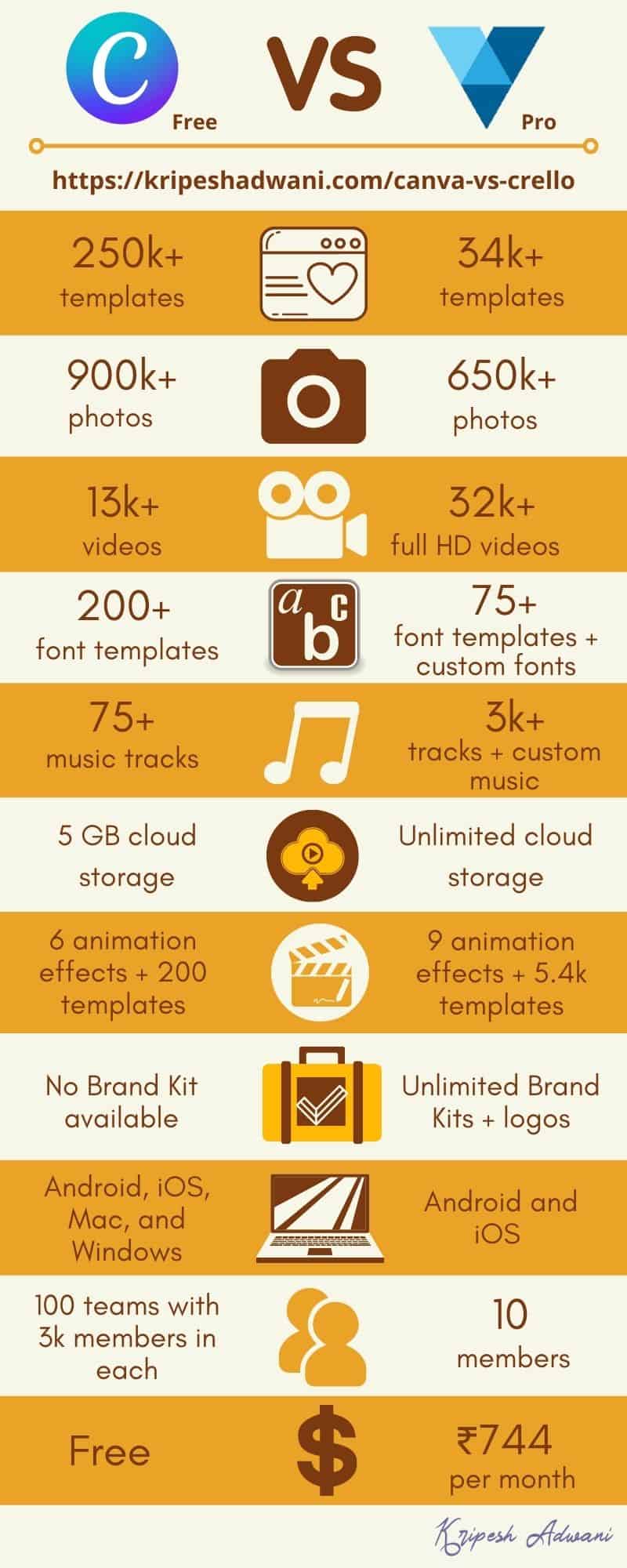
Credit: kripeshadwani.com
User Interface
The user interface is crucial for design tools. It impacts how easily users can create designs. This section compares the user interface of Canva and Crello.
Ease Of Use
Both Canva and Crello have user-friendly interfaces. They cater to beginners and experienced designers. Canva has a clean and intuitive layout. Its drag-and-drop functionality makes it easy to use. Everything is organized and accessible.
Crello also offers a simple and straightforward interface. Its layout is similar to Canva. You will find the tools and templates quickly. The learning curve for both platforms is minimal. This allows users to start designing right away.
Customization Options
Customization is a key aspect of design tools. Canva provides a wide range of customization options. Users can adjust colors, fonts, and elements easily. Canva’s library includes various templates and assets. This variety helps users create unique designs.
Crello also offers extensive customization options. It has a rich library of templates, animations, and objects. Users can modify these elements to suit their needs. Crello’s customization tools are user-friendly and versatile. This allows for a high level of creativity.
| Feature | Canva | Crello |
|---|---|---|
| Interface Layout | Clean and intuitive | Simple and straightforward |
| Ease of Use | Drag-and-drop functionality | Minimal learning curve |
| Customization Options | Wide range of templates and assets | Rich library of animations and objects |

Credit: www.youtube.com
Design Features
Choosing between Canva and Crello can be tough. Both offer strong design features. Let’s dive into their design capabilities. This will help you pick the right tool for your needs.
Templates Variety
Canva provides a vast array of templates. These templates cover many categories. You can find templates for social media, presentations, posters, and more. Whether you need a wedding invite or a business card, Canva has you covered. The templates are also easy to customize. This makes designing quick and straightforward.
Crello also offers a wide range of templates. They are designed for various purposes. From Instagram posts to event flyers, Crello has many options. The templates are fresh and modern. Crello’s templates make it easy to start a new project. You can tweak them to suit your style.
Graphic Elements
Canva shines with its graphic elements. It offers millions of photos, icons, and illustrations. You can add these elements to any design. The drag-and-drop feature makes this process simple. Canva also has many fonts and color schemes. This allows for a lot of creativity.
Crello also has a rich library of graphic elements. It includes photos, videos, and animations. These can enhance your designs. Crello’s elements are easy to use. Just drag and drop them into your design. You can also find unique fonts and color palettes. This helps to make your designs stand out.
Collaboration Tools
Collaboration tools are vital for design teams working remotely or in-office. Both Canva and Crello offer robust features to make teamwork seamless. Let’s dive into the collaboration tools provided by these two design platforms.
Team Collaboration
In terms of team collaboration, both Canva and Crello excel. Canva allows users to create teams, assign roles, and manage permissions easily. You can invite team members through email and organize them into different groups.
Crello, on the other hand, also offers great team collaboration features. It allows users to invite team members and assign roles. You can also set permissions for each team member, ensuring everyone has the access they need.
| Feature | Canva | Crello |
|---|---|---|
| Create Teams | Yes | Yes |
| Assign Roles | Yes | Yes |
| Manage Permissions | Yes | Yes |
Sharing Options
Both Canva and Crello offer multiple sharing options to facilitate easy collaboration. In Canva, you can share designs via email or link. You can also set the link to ‘view only’ or ‘edit’ mode.
Crello also provides a variety of sharing options. You can share your design via a direct link, and control whether the recipient can view or edit it. This makes it easy to get feedback or collaborate on a project.
- Email Sharing
- Link Sharing
- View/Edit Mode
Both platforms offer robust collaboration tools, making teamwork efficient and effective. Whether you choose Canva or Crello, you can be assured your team will work smoothly together.
Pricing Plans
Choosing between Canva and Crello often comes down to pricing plans. Both platforms offer diverse options to cater to different needs. Whether you are a beginner or a professional, understanding their pricing structures can help you make an informed decision.
Free Versions
Canva’s free version provides access to a wide range of tools. You get thousands of templates, images, and design elements. Though some premium features remain locked, the free version is quite robust.
Crello also offers a free version with similar benefits. Users can access thousands of templates and design elements. Crello’s free tier supports video designs, which is a unique offering.
Subscription Costs
Canva’s Pro plan costs $12.95 per month. This plan offers additional features like brand kits, premium templates, and advanced tools. You can also pay annually at a reduced rate of $119.40.
Crello’s Pro plan is slightly cheaper at $9.99 per month. It includes premium templates, team collaboration, and advanced editing tools. Annual subscriptions are available at $95.88, which provides further savings.
Both platforms offer enterprise plans for larger teams. Pricing for these plans varies based on specific needs.
Performance And Speed
Performance and Speed are crucial factors when choosing a graphic design tool. Users want a smooth experience without delays. Let’s compare Canva and Crello based on these aspects.
Loading Time
Loading time plays a vital role in user experience. A slow-loading tool can be frustrating.
Canva generally has a quick loading time. It offers a seamless start without much delay. Users can begin designing almost immediately.
Crello, on the other hand, also offers a fast loading time. It is slightly slower than Canva, but still impressive. Most users will not notice a significant difference.
Software Stability
Software stability ensures that the tool runs without crashes or bugs. It’s essential for maintaining workflow and avoiding data loss.
Canva is known for its stable performance. It rarely crashes and provides a reliable experience. Users can work on large projects without issues.
Crello also offers good software stability. It performs well under pressure and handles complex designs smoothly. Crashes are rare, making it dependable for regular use.
| Aspect | Canva | Crello |
|---|---|---|
| Loading Time | Very Fast | Fast |
| Software Stability | Highly Stable | Stable |
Both tools excel in performance and speed. Canva has a slight edge in loading time. Crello stands strong with its stability. Users can choose either based on their specific needs.
Customer Support
Canva offers a robust customer support system with live chat and email options. Crello provides support mainly through email and their help center. Both platforms ensure users get the assistance they need quickly and effectively.
An essential factor to consider is customer support. Both Canva and Crello offer various support options. Let’s break down their support channels and response times.Support Channels
Canva offers multiple support channels. Users can access a help center, community forums, and email support. They also have a detailed FAQ section. This helps users find quick solutions. Crello also provides several support channels. Users can reach out via email, live chat, and a help center. The help center includes guides and tutorials. These resources are easy to navigate.Response Time
Canva’s response time is typically quick. Email support usually responds within 24 hours. Their live chat offers faster responses, often within minutes. This ensures users get help promptly. Crello’s response time is also efficient. Email support often replies within 24 hours. Live chat responses are usually within a few minutes. This helps users resolve issues quickly. Both platforms prioritize timely support. Users can rely on quick and effective assistance. This enhances their overall experience. “`User Reviews
When choosing a design tool, user reviews play a crucial role. They offer real-world insights from those who have used the products. Let’s delve into what users are saying about Canva and Crello.
Customer Feedback
Canva users appreciate its intuitive interface. Many find it easy to learn and use. The drag-and-drop feature gets special praise. Users enjoy its vast library of templates and elements. It meets most design needs without much hassle.
Crello users also have positive feedback. They like the variety of ready-made templates. The platform’s ability to create animated designs stands out. Users mention that Crello is user-friendly and straightforward.
Industry Ratings
Canva often receives high ratings from industry experts. It is considered a top choice for beginners and professionals alike. Many reviewers highlight its versatility and ease of use.
Crello also garners favorable industry ratings. Experts appreciate its focus on animated content. It is seen as a strong alternative to Canva. Reviewers commend its robust feature set and affordability.
Final Verdict
Choosing between Canva and Crello depends on your specific needs. Both tools offer unique strengths. Let’s break down which one is best for different users.
Best For Beginners
Canva is ideal for beginners. Its user-friendly interface makes it easy to start. Here are some key features:
- Drag-and-drop functionality
- Extensive template library
- Simple editing tools
These features make Canva perfect for those new to graphic design. No prior experience is needed to create professional-looking designs.
Best For Professionals
Crello suits professionals seeking advanced design tools. It offers:
- More detailed customization
- Access to unique templates
- Advanced animation features
Crello’s advanced tools appeal to experienced designers. It provides more flexibility and depth for complex projects.
| Feature | Canva | Crello |
|---|---|---|
| Ease of Use | ⭐⭐⭐⭐⭐ | ⭐⭐⭐⭐ |
| Template Variety | ⭐⭐⭐⭐⭐ | ⭐⭐⭐⭐ |
| Customization Options | ⭐⭐⭐⭐ | ⭐⭐⭐⭐⭐ |
| Animation Tools | ⭐⭐⭐⭐ | ⭐⭐⭐⭐⭐ |
Both Canva and Crello offer robust tools for different users. Beginners will appreciate Canva’s simplicity, while professionals will value Crello’s advanced features.
Credit: www.virfice.com
Frequently Asked Questions
What Are Canva And Crello?
Canva and Crello are graphic design tools. They help users create visual content. Both offer templates for easy design.
Which Is Better, Canva Or Crello?
It depends on your needs. Canva offers more features. Crello is more affordable. Compare both to decide.
Does Crello Have A Free Plan?
Yes, Crello offers a free plan. It includes basic features. Some advanced features require a subscription.
Can I Use Canva For Social Media?
Yes, Canva is great for social media. It offers templates for various platforms. You can create posts, stories, and more.
Conclusion
Choosing between Canva and Crello depends on your needs. Canva offers a vast library and user-friendly interface. Crello, on the other hand, provides unique templates and features. Both tools are excellent for creating stunning visuals. Consider your budget and specific requirements.
Experiment with both to find the best fit. Happy designing!


